CompanyCam Review (2026): Pricing, Ratings, and Who Should Buy It
CompanyCam review (2026): $63/mo for one user billed annually, $29 per extra seat, 4.7 to 4.8 stars on every app store. Who needs it and who already has it.
 HVAC
HVAC- Published
- September 23, 2026
- Last reviewed
- September 24, 2026
- Read
- 13 min
- Sources
- 11 cited
Share this review
CompanyCam is a photo documentation app for contractors. Every photo your crew takes is timestamped, pinned to the job address, and stored in the cloud. It costs $63 a month for one user on an annual plan, and it does that one thing very well.
The catch is that one thing. CompanyCam does not schedule jobs, dispatch technicians, or run your books. It sits beside tools like Jobber and Housecall Pro rather than replacing them, so the real question is whether photos alone are worth a second subscription.
We checked every price, rating, and plan limit on September 24, 2026. Here is what we found.
Key takeaways
- CompanyCam costs $63 a month for the Core plan (1 user), $119 for Crew (3 users), and $249 for Scale (3 users), billed annually. Extra users are $29 each. Month-to-month is $79, $149, and $299, with extra users at $34.
- Ratings are unusually consistent: 4.7 out of 5 on Capterra (103 reviews), 4.7 on G2, 4.7 on Google Play (7,880 reviews), and 4.8 on the App Store (30,000 ratings).
- It is a documentation layer, not a field service platform. Crews that already run Jobber or Housecall Pro should decide whether the extra $63 to $249 a month beats the photo tools they already have.
What is CompanyCam used for?
CompanyCam is used to document job sites with photos and video, organized by project automatically. A technician takes a photo, and the app stamps it with the time and GPS location and files it under the right customer address. Nobody names a folder.
The company is based in Lincoln, Nebraska, per its Google Business Profile, and says more than 140,000 contractors use the app, with over 1 billion photos taken (CompanyCam, About page, retrieved September 24, 2026). Its demo form lists HVAC, plumbing, landscaping, and electrical.
For a service business, the practical uses are narrow but valuable. Before-and-after proof for a disputed invoice. A photo of a furnace model plate so the office orders the right part. A multi-day install timeline the customer can follow from their phone.
It is not a scheduling system. CompanyCam has added on-site payments (US only), invoicing and a price book (US and Canada), and proposals from Crew up.
Those are extras on a photo tool. If you need dispatch, read our Jobber review or Housecall Pro review first.
How much does CompanyCam cost per month?
CompanyCam costs $63 a month for Core, $119 for Crew, and $249 for Scale when billed annually, per its pricing page on September 24, 2026. Core includes one user. Crew and Scale include three. Every additional user is $29 a month on any plan.
The pricing page shows annual rates by default and says annual billing saves 20 percent. You can switch between monthly and annual at renewal.
Month-to-month, CompanyCam’s help center lists Core at $79, Crew at $149, Scale at $299, and extra users at $34 (Help Center, Plans Explained, retrieved September 24, 2026). That is 25 percent more on Core and Crew, 20 on Scale, 17 per seat.
Capterra and G2 still list Scale at $199. The vendor’s pricing page and help center both show $249 billed annually, so trust those two.
There is a free trial with no stated length beyond “cancel anytime.” There is no free plan. Enterprise pricing starts at 50 users and is quote-only.
| Plan | Annual | Monthly | Users | What it adds |
|---|---|---|---|---|
| Core | $63/mo | $79/mo | 1 | Timestamped photos and video (5 min), reports, offline mode, on-site payments, price book and invoicing, 10 AI credits |
| Crew | $119/mo | $149/mo | 3 | Checklists, tasks, live job map, client access, voice-note proposals, 10 min video, 100 AI credits |
| Scale | $249/mo | $299/mo | 3 | Unlimited templates and reports, subcontractor controls, LiDAR room measuring, e-signatures, translation, unlimited AI |
| Enterprise | Quote | Quote | 50+ | Single sign-on, multi-location hub, dedicated success manager |
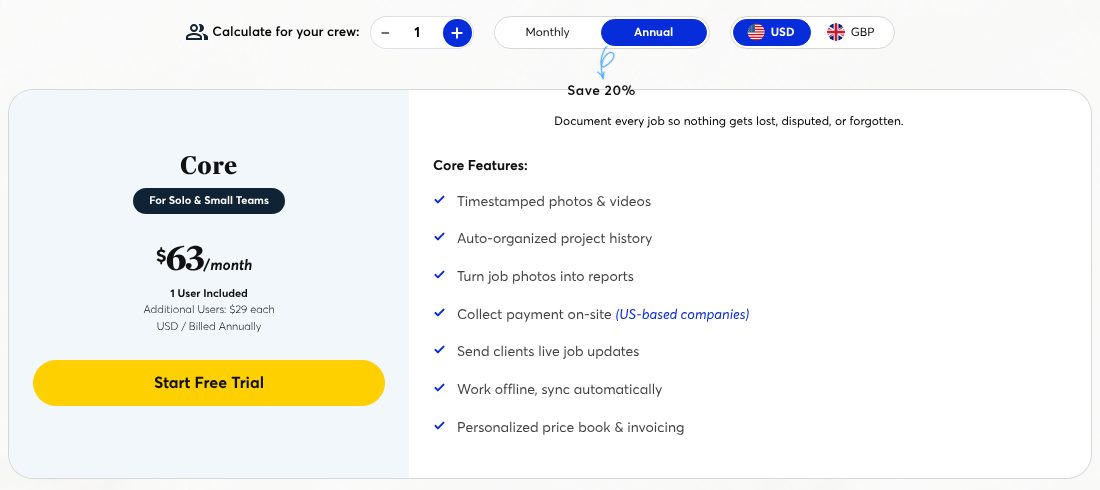
Do the per-head math. A five-person crew on Crew pays $119 plus two seats at $29, or $177 a month. Core costs $63 plus four seats, or $179. At three users Core is already $121, so Crew wins from three up.
Add-ons and device limits
Two costs hide behind the sticker. The Marketing Suite add-on (social posts, review requests, Business Profile sync) is $99 a month, or $79 on annual billing, and needs a sales call.
LiDAR measuring on Scale works only on iPhone 12 Pro or newer and recent iPad Pros.
What do CompanyCam reviews say?
CompanyCam rates 4.7 out of 5 on Capterra across 103 reviews, with sub-scores of 4.6 for ease of use, 4.6 for features, 4.5 for value, and 4.4 for customer service (Capterra, retrieved September 24, 2026). G2 shows 4.7 from 32 reviews.
The app stores agree, and their samples are far larger. Google Play lists 4.7 stars from about 7,880 reviews and more than 1 million downloads, last updated September 23, 2026. The App Store shows 4.8 from roughly 30,000 ratings.
For a field app, that mobile consistency is the number that matters.
The complaints cluster in three places. Individual Capterra reviews most often name price, with occasional crashes and weak label filtering behind it. Capterra’s own AI verdict adds upload hiccups, document handling, and mixed support.
The 3.7 on Google is the company listing. It mixes in support and billing gripes and is the lowest score anywhere.
The praise is just as consistent: easy to use, reliable photo organization, and integrations that push photos into other systems. Nobody reviews CompanyCam for its scheduling, because it does not have any.
Three things CompanyCam gets right
Three things stand out in the plan sheet and the reviews: organization that needs no effort from the crew, offline capture, and reports built from the photos you already took.
Automatic organization by job
Photos file themselves under the project by GPS location and time. That is the whole pitch, and Capterra reviewers rate ease of use 4.6 out of 5. A tech who will never rename a file will still produce a complete, dated record of every visit.
Offline mode and phone storage
The app captures without signal and syncs later, per CompanyCam’s own FAQ, and photos live in the cloud rather than the camera roll. For basements, mechanical rooms, and rural routes, that is the difference between a record and a gap.
Reports, checklists, and client updates
Core turns job photos into PDF reports and lets clients follow a live job page. Crew adds checklists, task assignment, and a live map of every open job. Scale makes templates and reports unlimited and adds e-signatures, so proposal, work, and sign-off live together.
Where does CompanyCam fall short?
The gaps are cost per seat, video limits, and the fact that it still needs a second system to run the business.
At $29 per extra user, a ten-technician shop on Crew pays $119 plus $203 in seats, about $322 a month, for photos. Capterra reviewers name price as the top complaint for a reason.
Jobber and Housecall Pro both attach photos to jobs inside plans you already pay for.
Video is capped at 5 minutes on Core and 10 on Crew and Scale. LiDAR measuring is iOS only.
AI features (walkthrough summaries, generated documents, checklists) are limited to 10 credits on Core and only become unlimited on Scale. CompanyCam’s pricing FAQ says AI is included from Crew up, so treat Core’s 10 credits as a taster.
And the tool does not schedule or dispatch at all. The pricing page lists no recurring billing, and the only accounting link is a QuickBooks Online connector that syncs photos and payments (CompanyCam, integrations page, retrieved September 24, 2026).
Payments are US only, and invoicing and the price book are US and Canada only. Any shop using it still needs a field service platform or a spreadsheet alongside it.
Is there a free version of CompanyCam?
No. CompanyCam has a free trial but no free plan, and the cheapest paid tier is $63 a month billed annually. The pricing page as of September 24, 2026 lists Core, Crew, Scale, and Enterprise only.
If you want free photo documentation, the honest answer is your phone’s camera plus a shared cloud album. It costs nothing and organizes nothing. The $63 buys the timestamps, the GPS filing, and the reports.
What is a cheaper alternative to CompanyCam?
For most HVAC, plumbing, and lawn-care shops, the cheaper alternative is the photo tool already inside their field service software.
Jobber starts at $29 a month billed annually ($21 for the first 12 months on its current promotion) and attaches photos and notes to every job. Housecall Pro starts at $59 and does the same.
Neither matches CompanyCam’s automatic GPS filing, annotation tools, or client-facing timelines. FieldPulse comes closer with its project photo tools, but it is quote-only.
If disputes, insurance claims, or multi-day projects are a regular part of your work, the dedicated tool earns its fee. If you mostly need a photo on the invoice, you already have it.
Who should buy CompanyCam?
Buy it if photo proof is a core part of how you get paid: restoration, roofing, remodel-style HVAC and plumbing installs, and commercial maintenance contracts where the customer wants a record. Crews of three or more should start on Crew.
Disclosure: FieldCompare may earn a commission if you buy Jobber or Housecall Pro through links on this page. It does not change the verdict.
If you have not picked a scheduling platform yet, our HVAC software hub lists the options CompanyCam sits alongside.
Skip it if you are a one-truck operation on Jobber or Housecall Pro and your photos already ride along with the job. Put the $63 toward the field service plan instead, and revisit CompanyCam when a customer first asks for a documented timeline.
Starting a shop from scratch? Our guide on how to start a plumbing business covers the software stack in order of need, and photo documentation sits well behind scheduling and invoicing on that list.
CompanyCam FAQ
What does CompanyCam cost for a three-person crew?
Core is $63 a month for one user, Crew is $119 for three, and Scale is $249 for three, billed annually. Extra users are $29 a month. Month-to-month the same plans are $79, $149, and $299, with extra users at $34 (help.companycam.com, September 24, 2026).
Does CompanyCam have a free trial?
Yes. There is a free trial you can cancel at any time, but no free plan. The lowest paid tier is Core at $63 a month billed annually.
Does CompanyCam work offline?
Yes. Photos and video capture on site without a signal and sync when the phone reconnects, per CompanyCam’s pricing FAQ. Everything is stored in the cloud, so it does not fill the phone’s camera roll.
Is CompanyCam worth it for a one-truck HVAC or plumbing shop?
Usually not at first. The photo features inside Jobber (from $29 a month) or Housecall Pro (from $59) cover basic job photos for less. CompanyCam wins on automatic organization, annotations, and client timelines, so it pays off once proof of work is routine.
What is the best construction photo app?
CompanyCam is one of the most widely reviewed options, with 4.7 on Capterra and Google Play and 4.8 on the App Store from more than 30,000 ratings. Built for contractors, it beats general photo apps on organization and field service platforms on documentation depth.
Is CompanyCam legit?
Yes. CompanyCam is a software company at 300 Canopy Street, Lincoln, Nebraska, used by more than 140,000 contractors and rated 4.7 to 4.8 across Capterra, G2, Google Play, and the App Store.
Its 3.7 Google Business Profile score reflects support and refund complaints about the company rather than problems with the app itself.
Can I export my photos if I cancel CompanyCam?
Yes. CompanyCam’s pricing FAQ says photos stay in your account while you are a customer and can be exported before access ends. Export what you need before the end of your billing period, since access runs to the end of the term.
The verdict
CompanyCam is a very good photo documentation app, and its 4.7 to 4.8 scores across four app-review platforms are hard to argue with. The price is the main objection: $63 for one user and $29 per extra seat adds up fast for photos alone.
Buy it when proof of work drives your revenue. Skip it when your field service software already carries the photos you need. Either way, run it on a trial first, and compare the per-seat total against your existing plan before the annual bill.
How we compiled this review
We verified every price and plan limit on companycam.com/pricing and every rating on Capterra, G2, Google Play, the Apple App Store, and CompanyCam’s Google Business Profile on September 24, 2026. Feature descriptions come from CompanyCam’s published plan comparison and FAQ.
The author is a software reviewer who covers the trades, not a contractor, so nothing here is first-hand field testing.
Sources
- CompanyCam, Pricing (Core $63, Crew $119, Scale $249 per month billed annually; additional users $29; annual saves 20%; AI credits 10/100/unlimited; Marketing Suite $99 monthly or $79 annual; pricing FAQ on storage, offline, export, and LiDAR devices), retrieved 2026-09-24, https://companycam.com/pricing
- CompanyCam Help Center, CompanyCam Plans Explained (monthly billing: Core $79, Crew $149, Scale $299, additional users $34; annual: $63, $119, $249, additional users $29), retrieved 2026-09-24, https://help.companycam.com/en/articles/14477655-companycam-plans-explained
- CompanyCam, About (140,000+ contractors, 1 billion+ photos), retrieved 2026-09-24, https://companycam.com/about
- CompanyCam, QuickBooks Online integration (syncs customers, projects, photos, and payments), retrieved 2026-09-24, https://companycam.com/integrations/quickbooks-online
- Capterra, CompanyCam reviews (4.7/5, 103 reviews; ease of use 4.6, customer service 4.4, features 4.6, value 4.5), retrieved 2026-09-24, https://www.capterra.com/p/171143/CompanyCam/
- G2, CompanyCam reviews (4.7/5, 32 reviews), retrieved 2026-09-24, https://www.g2.com/products/companycam/reviews
- Google Play, CompanyCam (4.7 stars, 7.88K reviews, 1M+ downloads, updated September 23, 2026), retrieved 2026-09-24, https://play.google.com/store/apps/details?id=com.agilx.companycam
- Apple App Store, CompanyCam App (4.8, 30K ratings, seller CompanyCam, Inc), retrieved 2026-09-24, https://apps.apple.com/us/app/companycam/id960043499
- Google Business Profile, CompanyCam, Lincoln NE (3.7/5, 142 reviews), retrieved 2026-09-24, https://www.google.com/maps?cid=6682980537412048381
- Housecall Pro, Pricing (Basic $59/mo billed annually), retrieved 2026-09-24, https://www.housecallpro.com/pricing/
- Jobber, Pricing (Core $29/mo billed annually; $21/mo first-year promotion showing on retrieval date), retrieved 2026-09-24, https://www.getjobber.com/pricing/
This review was last reviewed on September 24, 2026.
Every price, plan, and feature claim here was checked against the vendor's own documentation and other verified sources before publishing, and it's re-checked at least every 30 days under our editorial policy. Spotted something off? Tell us, and corrections usually ship within 48 hours.

Mohammad HumzaFounder & reviewer · Full-stack & custom software developer
FieldCompare is built and run by Mohammad Humza, a full-stack and custom software developer who ships web apps, WordPress sites, and mobile apps for a living.
He reviews field-service software with that same builder's eye, scoring every platform on one rubric so each verdict reflects real performance, not vendor marketing.
Reviewed by M. Humza, reviewer at FieldCompare·Category: HVAC
Get the next review the day it drops
One email per review. No vendor spin, no spam.
More HVAC reviews

- September 23, 2026
- ·
- By M. Humza
How Much Do HVAC Business Owners Make? (2026)
HVAC business owners average $86,197 a year (ZipRecruiter, Sep 2026), from about $40,000 under $1M revenue to $250,000+ above $10M. Owner vs technician math.

- August 31, 2026
- ·
- By M. Humza
FieldPulse Review (2026): Pricing, Pros and Cons
FieldPulse holds 4.6/5 across 492 Capterra reviews (Aug 2026). Our independent take on its quote-only pricing, all-in-one features, pros and cons.

- August 31, 2026
- ·
- By M. Humza
How Much Do HVAC Technicians Make? (2026 Salary Guide)
HVAC techs earned a median of $61,010 a year in May 2025 (about $29.33/hr), and the top 10% cleared $95,210. See 2026 pay by experience, state and overtime.